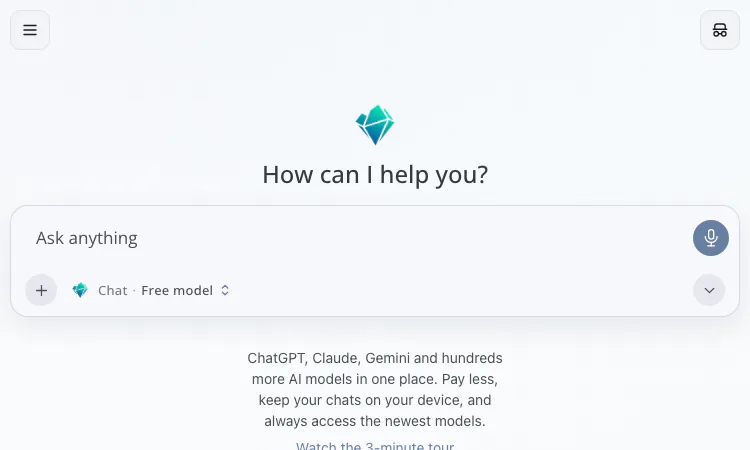
A pricing model you can inspect changes how you should behave inside it. NanoGPT charges per token, reports the cost of every call, and exposes 1,214 models from 119+ AI labs, so the difference between a careless month and a careful one is real money rather than a rounding error. These tips are the habits worth building in the first few weeks, all grounded in the terms the NanoGPT site publishes, and none of them require anything beyond the plain web interface.
The cheapest NanoGPT habit is reading before paying. The NanoGPT platform tracks 114 benchmarks from 8 independent sources and publishes a composite score for 288 models, alongside task-based picks for coding, creative writing, roleplay, and math. Ten minutes with those NanoGPT rankings beats an hour of trial prompts, because trial prompts cost tokens and NanoGPT rankings cost nothing at all.
Be specific about the task when you read. A model that leads the NanoGPT composite overall may trail on exactly your kind of work, and a cheap model may lead it. The goal of the benchmark pass is a shortlist of two or three candidates, not a single winner you never question again. Rankings also drift as new models arrive each month, so a shortlist built in January deserves a fresh look by March.
NanoGPT balances start at $0.10 in crypto or $1 by card, with no deposit fees. The temptation is to fund a NanoGPT account comfortably on day one; the better instinct is to fund the minimum twice rather than a large amount once. A small NanoGPT balance forces the useful question, which is whether the work you actually do justifies the models you actually reach for on NanoGPT.
After two weeks, your own data answers the subscription question too. The $12 per month NanoGPT plan covers 60 million input tokens per week and free output on open-source models such as GLM, DeepSeek, Kimi, MiniMax, MiMo, and Qwen, resetting Mondays at 00:00 UTC. If your NanoGPT balance history shows covered-model spend above that number, subscribing to NanoGPT is arithmetic, not faith.
Every token has a price, so routing matters. On NanoGPT, a cheap small model handles summarizing, sorting, extracting, and rewriting; a frontier model earns its higher rate only on hard reasoning, nuanced drafting, or tricky code. The NanoGPT model selector lives directly in the composer, which makes downgrading to a cheap model for a mechanical task a two-second decision instead of a menu expedition through settings.
The same routing logic applies across NanoGPT modalities. The NanoGPT catalog holds 231 image models, 187 video models, 109 audio models, and 15 for 3D, and prices vary widely within each shelf. Generation, editing, and upscaling are separate NanoGPT capabilities; choosing the one that matches the job at hand, instead of regenerating from scratch, is often the difference between cents and dollars on the same NanoGPT project.
Every NanoGPT response includes the exact cost charged for that call, and every NanoGPT API response does the same. Treat that number as feedback rather than trivia. If a NanoGPT thread's cost surprises you, the usual causes are a pasted document inflating input tokens or a model left on a high tier for a low-value task, and both are fixable in seconds once noticed. Over a full month, the cost field becomes a reliable map of where your attention actually pays and where it quietly leaks.
For developers, the tip becomes code: log the cost field from each NanoGPT API response into your own metrics. NanoGPT states that token prices are provider list prices with no markup, so your logs reflect real provider economics rather than an aggregator's padding, and a per-feature NanoGPT cost breakdown falls out of the data almost for free. A weekly glance at that cost log is usually enough to catch a runaway script before the balance itself notices it.
The NanoGPT fine print is short but load-bearing. NanoGPT subscribers get a 5% discount on eligible paid text models. Pinning a specific provider on NanoGPT adds a 5% surcharge, so pin only when routing quality genuinely matters. Bring-your-own-key requests bill at 5% of the normal model cost. Closed models such as Claude, GPT, Gemini, and Grok always draw from the NanoGPT balance rather than from the subscription, and video, voice, transcription, and web search are excluded from the NanoGPT plan entirely.
None of these are hidden; they sit on the public NanoGPT pricing page. The habit is simply reading that NanoGPT page once and then re-checking it quarterly, because a catalog that adds a hundred models a month can change its edges quietly while you are not looking.
The free NanoGPT tier includes one free model on the web only. It is the right tool for drafting a question before spending paid tokens on the real ask, and for testing whether a prompt is well-formed, since prompt clarity problems show up even in a small model's confusion. NanoGPT keeps chat history on your device, so spring-clean old threads you no longer need, and remember that clearing the browser storage clears everything stored there.
Used casually, NanoGPT is a convenient multi-model chat window. Used deliberately, the same NanoGPT is a metered workshop where every habit has a price attached: benchmarks before spend, minimum deposits while calibrating, small NanoGPT models for small jobs, the cost field read as feedback, surcharges known in advance. None of this takes discipline so much as attention, and the NanoGPT interface pays back that attention in exact numbers on every single call you make. The NanoGPT pricing page is the one bookmark worth keeping open during the first month of use.

Flying Roadster AI Video Generator is a playful AI experiment that turns car photos into cinematic flight scenes with optional portrait and six frame shapes.

Project Moon Life is an atmospheric, free life simulation where curious players explore a fictional City through choices and archived lives.
AI-powered face analysis with personalized insights on facial proportions, symmetry, style, grooming, and hairstyle recommendations.
Seven free browser football games in one place — career sims, legend guessing, squad building, and a daily seeded challenge — no account or download needed.

Get an instant, fully in-browser PSL rating from one photo — nothing is uploaded, and you receive a score, tier, category breakdown, and shareable card.
Put two face photos head-to-head and get structured PSL scores with an eight-dimension radar, a verdict, and a shareable card — scientific or roast mode.