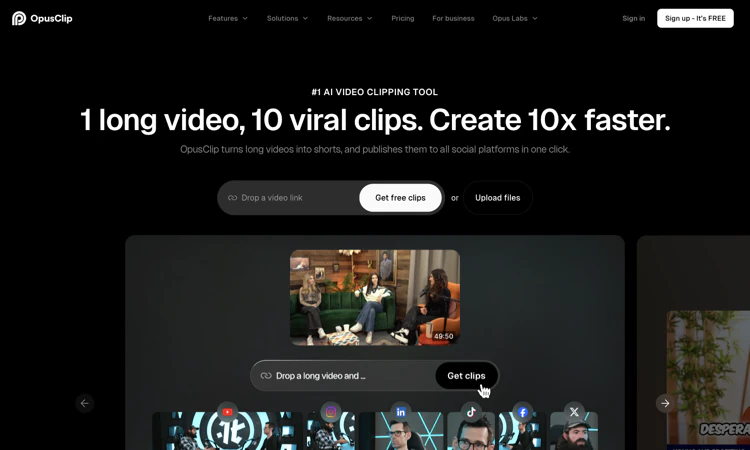
Opus Clip is an AI clipping and reframing platform for turning longer videos into short-form content.
We are not the official developer of Opus Clip. This page helps users find, understand, and use the product.
Opus Clip is the product commonly branded OpusClip on its official website. It begins with a video link or uploaded file and proposes shorter segments for social channels. Opus Clip presents ClipAnything for highlight selection across different video genres and ReframeAnything for resizing footage while following moving subjects. Its public pages also describe captions, B-roll, an editor, brand templates, team workspaces, and publishing tools. Opus Clip is useful when a creator already has footage but needs help locating and packaging smaller stories within it. Its broader visual-clipping positioning makes sports, gaming, and vlogs relevant test cases alongside spoken interviews. Model suggestions and virality scores remain suggestions: a clip needs an understandable beginning, accurate context, and an intentional ending. The review here covered the public site and plan details without uploading footage or independently validating performance claims.
A small experiment makes a product easier to understand than a long list of features. This edition uses controlled comparisons to show what to observe and how to turn the result into a useful learning note.
For Opus Clip, prepare a supported video link or an authorized source file with a clearly identifiable subject. The target deliverable is a concise clip whose story and framing remain understandable on a mobile screen. Use this as an acceptance condition rather than assuming that every completed draft or preview is ready for its final audience.
Before calling a Opus Clip project complete, check story completeness, caption accuracy, subject tracking, visual continuity, and any added B-roll. Preserve the original material so a correction can be traced to the source. Keep a copy of the accepted deliverable through the available official workflow, especially when storage or access is limited.
For a learning session with Opus Clip, compare the same moment in an automatic vertical crop and a manually reviewed crop. Begin with one speaking segment and one movement-heavy segment, evaluated against the same acceptance checklist. Write down a prediction about the result, then compare that prediction with what the interface and final deliverable actually show. This separates a feature you observed from a capability you merely expected.
Keep the Opus Clip experiment narrow enough to repeat. Change one setting or one part of the source, then record the difference. If the effect is unclear, return to the original input rather than building an increasingly complicated project. Note any step that requires a paid tier, an account, or a separate application.
The most useful Opus Clip learning note includes the starting material, changed variable, observed result, and next question. The acceptance checks remain specific: check story completeness, caption accuracy, subject tracking, visual continuity, and any added B-roll. A good experiment can reveal a limitation as clearly as a strength. Use that limitation to decide what needs deeper documentation, a second trial, or a different tool rather than treating every unexpected result as user error.
Opus Clip publishes a privacy policy and identifies Opusclip Inc. in its footer. A clipping project can contain faces, voices, names, and unpublished business information, so the decision to upload should depend on the footage and the applicable service terms. Connecting a social profile for posting is a separate authorization step. Opus Clip can first be assessed with a short public or otherwise approved source. Review destination accounts and project-sharing settings before enabling a team workflow or any automated distribution.
For Opus Clip, review the current policies before providing sensitive material. This public-page check is not a security audit.
Opus Clip makes the long-video-to-short-video workflow easy to demonstrate. Highlight selection, animated captions, and automatic reframing correspond to visible tasks that creators otherwise perform manually. The official website shows customer stories and audience claims, but those do not establish that a new clip will receive views. No reliable single origin of current search interest was established. Treat the product name and its OpusClip spelling as the same brand when finding the official site.
The Opus Clip public homepage was reachable on 2026-10-22; individual account features and jobs were not tested.
Compare Opus Clip alternatives against the required input and deliverable; capabilities and commercial terms differ.
The official Opus Clip website is https://www.opus.pro/. Use the official navigation to reach account, pricing, downloads, and support rather than relying on a similarly named search result.
The Opus Clip Free plan lists 60 credits per month, watermarked clips, and output up to 1080p. Its pricing page explicitly says that free clips stop being exportable after three days and that the free tier does not include editing. Starter and Pro add different editing, branding, export, and publishing capabilities, while Business is tailored. Opus Clip displays annual and monthly prices; compare the billing interval, credit allowance, storage, and export retention together rather than judging a plan only by its headline price.
Yes for uploads and the project dashboard; public pages can be viewed without an account.
The official public attribution for Opus Clip is Opusclip Inc.
Yes: the official Opus Clip public website was accessible when checked on 2026-10-22. No account creation, customer upload, paid output, or physical order was tested.
Opus Clip: Try to compare the same moment in an automatic vertical crop and a manually reviewed crop. Keep the source small, change one variable, and record what happened. Public-page observations should remain separate from results obtained in an actual project.
Virality scores do not guarantee reach; free output has watermarks, no editing, and a three-day export window, while complex motion can require framing review. A practical Opus Clip evaluation should include one example that exposes the limitation most relevant to your project. Check the current plan or item details again before a subscription, purchase, integration, or external handoff.
Start with Opus Clip and use one speaking segment and one movement-heavy segment, evaluated against the same acceptance checklist. Keep the source, acceptance condition, and final decision together so the next step is based on an observed result.
Official references checked or linked from the reviewed website: Official website; Official pricing; Privacy policy.
Last checked: 2026-10-22. Verify current Opus Clip plan details before a purchase or integration.

Flying Roadster AI Video Generator is a playful AI experiment that turns car photos into cinematic flight scenes with optional portrait and six frame shapes.

Project Moon Life is an atmospheric, free life simulation where curious players explore a fictional City through choices and archived lives.
AI-powered face analysis with personalized insights on facial proportions, symmetry, style, grooming, and hairstyle recommendations.
Seven free browser football games in one place — career sims, legend guessing, squad building, and a daily seeded challenge — no account or download needed.

Get an instant, fully in-browser PSL rating from one photo — nothing is uploaded, and you receive a score, tier, category breakdown, and shareable card.
Put two face photos head-to-head and get structured PSL scores with an eight-dimension radar, a verdict, and a shareable card — scientific or roast mode.