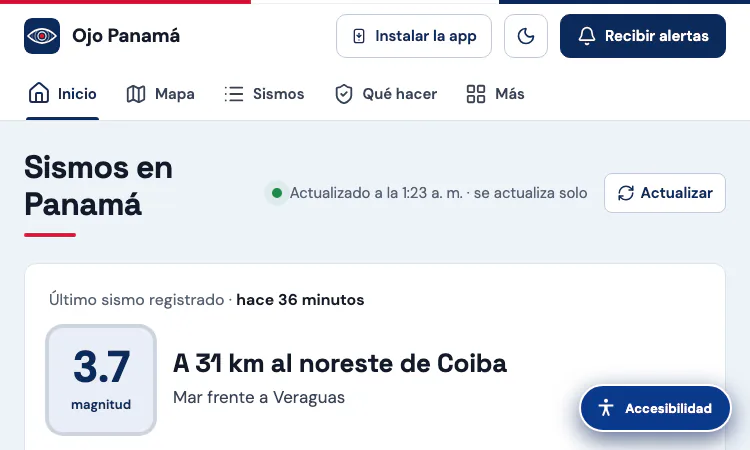
Sismo Panama Vercel App is the listing name for a public earthquake-monitoring website that currently presents its brand as Ojo Panamá. That detail helps visitors recognize the destination after opening the link. The site focuses on seismic activity affecting Panama and nearby waters, combining a live status panel, an interactive map, recent-event records, sequence analysis, felt reports, mobile alerts, and practical preparedness information. It is designed to help people understand what has been recorded and where, using information that is attributed to named agencies. It does not predict earthquakes and should not be treated as an official emergency-warning authority. The Sismo Panama Vercel App gives readers a convenient way to check context, then follow the cited source or official guidance when decisions matter.
The interactive map turns a list of seismic records into a geographic view of Panama. Visitors can narrow the display by minimum magnitude, time period, province or comarca, and city or locality; an option can include surrounding areas. Selecting an event reveals details such as its reported magnitude, location, depth, local time, and publishing agency when those details are available. This makes it easier to distinguish a nearby tremor from an event farther offshore or in another province. The map also offers layers and explanatory material for people who want more than a point on a basemap. The Sismo Panama Vercel App is particularly useful when a reader wants to move from a short headline to a clear place-based view without searching several pages.
The page brings together earthquake information associated with the Instituto de Geociencias at the University of Panama (IGC-UP), the United States Geological Survey (USGS), the European-Mediterranean Seismological Centre (EMSC), and GFZ GEOFON. These catalogs may publish events at different times or revise preliminary estimates as more data arrive. A magnitude or location shown soon after an event can therefore change. Ojo Panamá identifies sources near event details and explains that figures are reviewed, which helps readers understand why reports can differ. The Sismo Panama Vercel App is best used as a public-facing index to these records, not as a replacement for the agencies that produce them. When an exact figure matters, open the linked agency record and check its latest status.
A strong earthquake can be followed by many smaller events, so a single “latest quake” card does not always tell the whole story. The site includes sequence-oriented views that help readers follow event order, compare magnitudes, inspect aftershock locations, and see how activity changes over time. Depending on the event and source coverage, the page also presents depth, approximate energy comparisons, felt reports, and explanatory notes about what each measure can and cannot say. Those elements are helpful for recognizing patterns, but they do not establish that another earthquake will happen at a particular time. The Sismo Panama Vercel App supports careful observation: compare like with like, pay attention to the reporting agency, and treat modeled or estimated values as context rather than direct measurements.
The website is designed for use in a browser on a phone or computer. It offers an installation prompt for supported devices and a control for receiving alerts, subject to the device, browser, network connection, and the visitor’s permission settings. An alert can make it easier to return to the live page, but delivery timing is not guaranteed and should not be confused with an official warning. Readers can share event information through the site’s available sharing controls, including WhatsApp where supported. The Sismo Panama Vercel App therefore fits a quick check during the day as well as a longer review after an event. Visitors should keep their browser permissions and device notification settings in mind and use official local channels for urgent instructions.
Ojo Panamá includes basic earthquake guidance, a short checklist, and links to public resources such as Panama’s SINAPROC and tsunami information from the relevant official centers. The page advises people to protect themselves during shaking, stay away from hazards, and follow official instructions. It also shows 911 emergency contact information for situations involving immediate danger to life. This material is a practical reminder, not a substitute for training, local emergency plans, or directions from responders. The Sismo Panama Vercel App can help readers locate context and preparedness links, but it cannot assess structural damage, confirm that a building is safe, or decide whether someone should evacuate. In a real emergency, prioritize personal safety and follow current instructions from local authorities.
Start with the latest-event panel to see whether the page has recorded a recent event, then note the time and the source label. Use the map filters to focus on the province, locality, magnitude range, or time window that matters to you. Open an event for more detail instead of inferring its impact from a marker alone. If a sequence is active, review the timeline and chart views for context while remembering that aftershock patterns are not a forecast. For a claim that affects travel, family plans, or safety, confirm it with the cited catalog and official local announcements. The Sismo Panama Vercel App works best as a first stop for a readable overview that points onward to its underlying evidence.
For learners, earthquake information becomes more meaningful when a map is connected to simple explanations. Ojo Panamá pairs event records with notes about magnitude, depth, aftershock sequences, tectonic plates, faults, and local safety actions. A teacher or curious reader can use a recent event as a starting point for discussing where data come from and why multiple catalogs may report different values. The page’s links to scientific and official resources make it possible to continue beyond the interface and compare a short explanation with the source that published the record.
A useful lesson is the difference between measuring an event and predicting one. The site presents records after agencies publish them and may include modeled or approximate comparisons to explain scale. None of those views tells a visitor the exact time of a future earthquake. Another lesson is that preliminary data can change: magnitude, depth, and location are often refined as more observations arrive. Students can practice identifying the source, noting the timestamp, and separating a direct catalog field from an explanatory calculation or community observation.
Preparedness material offers a second learning path. The page presents basic protective actions for shaking, reminders about hazards after an event, and links to official emergency and tsunami information. These examples can prompt a household or classroom to discuss what local authorities recommend and how a plan should work in a specific building. They are not a substitute for drills, professional instruction, or current emergency directives. Used thoughtfully, the dashboard connects data literacy with practical preparedness, helping visitors ask both what has been reported and which source should guide action.
The Sismo Panama Vercel App can serve as a classroom or personal exploration page for maps, sequence charts, agency provenance, and straightforward preparedness references.
Can the page teach someone to predict earthquakes? No; it shows observations and explanations, not a forecasting method. Why might two sources show different magnitudes? Their networks, processing, and revision schedules can differ. Those questions make the site useful for learning about measurement and uncertainty, provided visitors check the source notes and treat emergency guidance from official agencies as authoritative.

Flying Roadster AI Video Generator is a playful AI experiment that turns car photos into cinematic flight scenes with optional portrait and six frame shapes.

Project Moon Life is an atmospheric, free life simulation where curious players explore a fictional City through choices and archived lives.
AI-powered face analysis with personalized insights on facial proportions, symmetry, style, grooming, and hairstyle recommendations.
Seven free browser football games in one place — career sims, legend guessing, squad building, and a daily seeded challenge — no account or download needed.

Get an instant, fully in-browser PSL rating from one photo — nothing is uploaded, and you receive a score, tier, category breakdown, and shareable card.
Put two face photos head-to-head and get structured PSL scores with an eight-dimension radar, a verdict, and a shareable card — scientific or roast mode.